Why Accounts Payable Invoice Automation Is the Smartest Upgrade Your Business Can Make
Accounts payable invoice automation is the use of software to replace manual invoice handling: capturing, matching, approving, and paying invoices automatically with little to no human effort.
Here’s what it does in plain terms:
- Captures invoices digitally from email, PDF, or paper using OCR technology
- Extracts and validates invoice data against purchase orders and receipts
- Routes approvals automatically to the right people
- Processes payments electronically and syncs everything to your accounting system
- Flags exceptions like duplicates or mismatches before they become costly mistakes
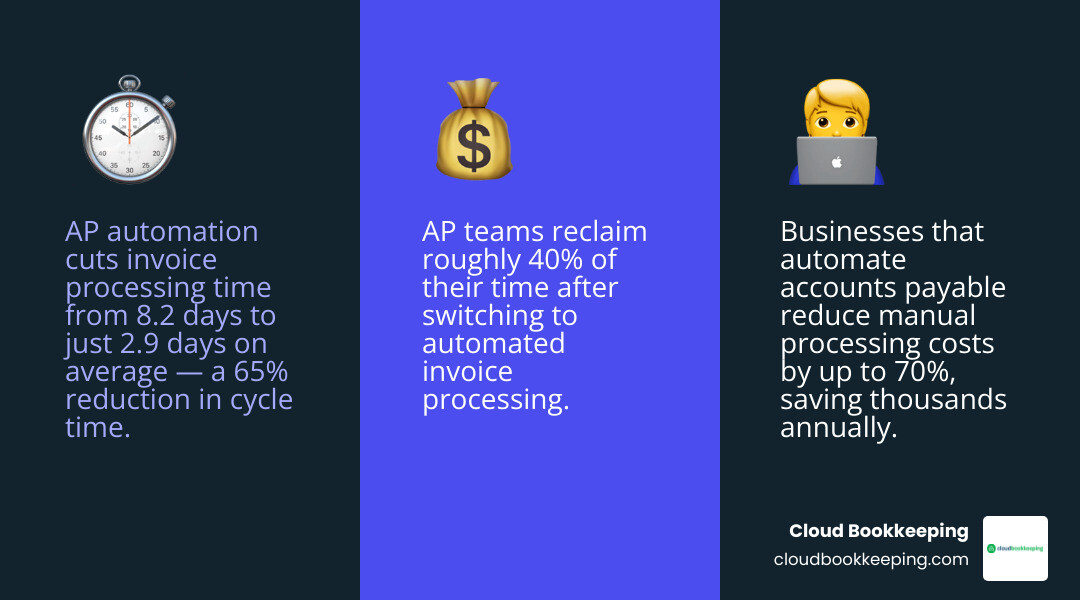
The payoff is real. Organizations that automate AP reduce invoice processing time from an average of 8.2 days down to just 2.9 days: and some systems get that down to 1.4 days. Manual processing costs drop by as much as 70%, and AP teams save roughly 40% of the time they used to spend on processing.
If you’re a small business owner still approving invoices by hand, chasing paper, or manually entering data into QuickBooks, this guide is for you.
I’m Charlie Perrin, founder of Cloud Bookkeeping, and with over 24 years of experience helping small business owners streamline their financial operations, I’ve seen how much time and money gets wasted on manual accounts payable invoice gaps. In the sections ahead, I’ll walk you through exactly what to do about it.
Why Manual Accounts Payable is a Nightmare (and How to Wake Up)
Let’s be completely honest: nobody goes into business because they love manual data entry. Yet, in many offices across San Antonio, brilliant managers and business owners spend hours every week staring at paper invoices, typing numbers into spreadsheets, and chasing down managers for approvals.
It is a slow, mind-numbing process, and it is incredibly prone to human error. When a tired team member manually enters dozens of invoices a day, numbers get transposed, decimal points shift, and duplicate payments slip through the cracks. These seemingly minor slip-ups contribute directly to the costly consequences of bookkeeping mistakes, which can slowly drain a company’s cash reserves.
Beyond simple typing mistakes, manual AP setups are plagued by structural bottlenecks. Invoices get buried under stacks of paper on a manager’s desk, leading to late payments and missed early-payment discounts. Vendors call constantly to ask when they will get paid, forcing your team to stop what they are doing and hunt down the status of an invoice. This lost productivity represents a massive hidden tax on your business growth.
These inefficiencies are classic examples of common issues faced in bookkeeping that hold businesses back. If your desk is covered in sticky notes and your inbox is overflowing with PDF invoices, it is time to wake up from the manual nightmare and embrace a system that does the heavy lifting for you.
What is Accounts Payable Invoice Automation and How Does It Work?
At its core, accounts payable invoice automation is about removing the friction between receiving a bill and paying it. Instead of forcing human beings to act as data-entry bridges between different systems, software takes over the repetitive, rule-based steps of the AP lifecycle.
It all starts with intelligent invoice capture. When a vendor emails a PDF invoice, the automation software intercepts it immediately. Even if you receive a physical paper invoice, you can quickly scan it using a mobile app or office scanner.
Once the document is in the system, advanced Optical Character Recognition (OCR) technology reads the invoice. Unlike basic scanning tools of the past, modern OCR doesn’t just take a picture of the document; it reads the text, identifies key fields (like vendor name, invoice date, line-item details, tax, and total amount due), and extracts this data automatically.
By transitioning to streamlined invoice processing, you eliminate the need to type this information into your accounting software manually. The software handles the data extraction, leaving your team to simply review and verify the results. This shift to automated AP workflows ensures that your financial data is captured quickly, accurately, and without human bias.
The Core Mechanics of Accounts Payable Invoice Automation
To understand how this functions on a day-to-day basis, let’s break down the core mechanics of a fully automated AP workflow:
- Validation: The system automatically checks the extracted data to ensure the invoice is mathematically correct, the tax rates are accurate, and the vendor exists in your master database.
- Matching: The software performs a “three-way match” by comparing the invoice against the original purchase order (PO) and the receiving receipt. If the quantities and prices match within your pre-defined tolerance levels, the invoice is cleared.
- Approval Routing: If an approval is required, the system routes the digital invoice to the appropriate manager based on rules you establish (e.g., routing by department or dollar amount). The manager receives a notification and can approve it with a single click.
- Exception Resolution: If the software detects a mismatch, such as a price discrepancy or a duplicate invoice number, it flags the invoice as an exception and alerts your AP team to investigate.
- ERP and Accounting Synchronization: Once approved, the software seamlessly syncs the invoice data with your general ledger or ERP system (like QuickBooks), updating your financial records in real time.
- Payment Execution: Finally, the system schedules and executes the payment digitally via ACH, virtual card, or check, completing the transaction securely.
How AI Transforms Accounts Payable Invoice Automation
While traditional automation relies on rigid, “if-this-then-that” rules, Artificial Intelligence (AI) takes AP automation to an entirely new level.
AI-driven systems utilize machine learning to study your historical transactions. For example, if the system notices that you always code invoices from a specific utility company to a certain General Ledger (GL) account, it will begin predicting and applying that coding automatically. This predictive coding saves hours of manual categorization.
Furthermore, AI excels at anomaly detection. It can analyze thousands of transactions in seconds to spot weird patterns, such as a vendor charging slightly higher prices than usual, or an invoice arriving from an unrecognized email address. This proactive defense helps you catch errors and potential fraud before any money leaves your bank account. The ultimate goal of AI in AP is “touchless processing,” where standard, clean invoices flow through the entire system from receipt to payment without a single human ever needing to touch them.
The Lazy Manager’s Guide to ROI and Key Benefits
If you like the idea of doing less manual work while getting better results, the return on investment (ROI) of AP automation will speak directly to your inner “lazy manager.”
First, consider the drastic reduction in processing times. Instead of taking over a week to manually route, verify, and pay a bill, automated systems slash that cycle down to less than three days. This speed gives you unmatched visibility into your cash flow, allowing you to see exactly what liabilities are coming due without waiting for the end of the month.
Second, the cost savings are undeniable. When you calculate the labor hours spent on data entry, chasing approvals, and fixing mistakes, manual processing is incredibly expensive. By cutting manual processing costs by 70%, those savings go straight back to your bottom line. Additionally, faster processing means you can easily secure early-payment discounts from vendors while completely avoiding late fees.
Finally, your vendor relationships will improve dramatically. Vendors get paid faster and more reliably, and self-service portals can let them check payment status without calling your team. That means fewer follow-up emails and less time spent tracking down invoices. Pairing an automated AP workflow with practical invoice-management habits and stronger bookkeeping processes turns an administrative bottleneck into a smoother, more hands-off operation.
| Metric | Manual AP Process | Automated AP Process |
|---|---|---|
| Average Processing Time | 8.2 Days | 1.4 to 2.9 Days |
| Manual Processing Costs | High (labor, paper, postage) | Reduced by up to 70% |
| Time Spent on Processing | Baseline (100% manual effort) | Reduced by 40% |
| Exception Rates | High (frequent human errors) | 75% Lower Exception Rate |
| Early Payment Rebates | Rarely captured | Maximized via virtual cards |
Essential Features to Look For in AP Software
Not all AP automation platforms are created equal. When you are shopping for a solution to fit your business, look for features that maximize efficiency and reduce security risks.
To protect your business from cash leaks, prioritize these essential features:
- Automated Three-Way Matching: The software must be able to automatically cross-reference invoices, purchase orders, and receiving documents. This is your best defense for preventing financial errors and ensuring you only pay for what you actually ordered and received.
- Intelligent Purchase Requests: Control spending before it happens by requiring team members to submit digital purchase requests for approval before making purchases.
- Mobile Approval Workflows: Busy managers shouldn’t hold up the payment queue. Choose software that offers a mobile app so approvers can review and sign off on invoices on-the-go.
- Real-Time Reporting and Dashboards: You need clear, visual dashboards that show your outstanding liabilities, upcoming payment schedules, and departmental spending patterns at a glance. This visibility is crucial for spotting bookkeeping mistakes early.
Best Practices for a Painless Implementation
Transitioning to a new software system can feel intimidating, but a structured approach ensures a smooth, successful launch.

To ensure your team adopts the new system with enthusiasm, follow these practical steps:
- Clean Up Your Existing Data: Before syncing any new software with your accounting system, clean up your vendor list. Remove duplicate profiles, update outdated contact information, and archive inactive vendors.
- Standardize Your Approval Policies: Clearly define who needs to approve what. Set up simple rules based on department or dollar thresholds so the software can route invoices without confusion.
- Run a Phased Pilot Program: Don’t try to transition your entire business overnight. Start by automating AP for a single department or a small group of trusted vendors. Use this pilot to test the workflows and iron out any kinks.
- Focus on Change Management: Show your team how the software will make their jobs easier by removing boring data-entry tasks. Provide simple, hands-on training to build confidence.
By taking these steps, you will quickly address the signs your bookkeeping system needs improvement before they create bigger problems. Combining these software strategies with classic small business bookkeeping tips will position your company for smooth, scalable growth.
Frequently Asked Questions about AP Automation
Does AP automation replace my existing ERP or accounting software?
No, AP automation does not replace your accounting software or ERP. Instead, it acts as a specialized, high-efficiency assistant that works alongside it.
Your accounting system (like QuickBooks) remains your official financial system of record. The AP automation software sits “in front” of it, handling the messy work of gathering invoices, extracting data, and routing approvals. Once an invoice is fully approved and ready, the automation software syncs the clean data directly into your accounting system, ensuring your general ledger is perfectly updated without any manual double-entry.
How does automated invoice processing prevent payment fraud?
Manual payment processes are highly vulnerable to fraud, from fake invoices to altered banking details. Automated systems protect your cash by enforcing strict internal controls.
First, three-way matching ensures that invoices without matching purchase orders and receipts are flagged instantly. Second, digital workflows prevent unauthorized changes to vendor banking details by requiring multi-step verification. Finally, by utilizing digital payment methods like virtual cards, the system generates unique, single-use card numbers for specific transaction amounts, making it virtually impossible for bad actors to steal or reuse your account numbers.
Is AP automation worth it for small businesses?
Absolutely. Many small business owners assume that automation is only for massive corporations, but small businesses often have the most to gain.
When you run a lean team, every hour spent on manual data entry is an hour taken away from serving clients or growing your business. AP automation scales with you, allowing you to handle a growing volume of transactions without needing to hire additional administrative staff. Investing in these tools, often in partnership with professional small business bookkeeping services, is one of the most cost-effective ways to build a highly efficient, professional finance department.
Conclusion
Automating your accounts payable process is no longer a luxury reserved for giant enterprises. It is a practical, highly accessible upgrade that saves time, slashes administrative costs, and protects your business from expensive errors. By letting intelligent software handle the data entry, matching, and routing, you can finally focus your energy on running your business.
At Cloud Bookkeeping, we specialize in helping San Antonio business owners transition away from chaotic, manual paperwork and move toward modern, streamlined workflows. Under the local leadership of Charlie Perrin, our team brings deep QuickBooks expertise and personalized advisory services directly to your business.
Whether you are looking to clean up your books, optimize your workflows, or implement modern bookkeeping software solutions that scale with your growth, we are here to support you every step of the way. Reach out to us today, and let’s build a simpler, smarter financial operations engine for your business.