Why Choosing the Right Cloud Based Accounting Package Can Make or Break Your Business Finances
Cloud based accounting packages have changed the way small business owners manage their money — and if you’re trying to figure out which one is right for you, here’s the short answer:
The most popular cloud accounting packages for small businesses are:
| Software | Best For | Starting Price (2026) |
|---|---|---|
| QuickBooks Online | All-around small business use | $19/month |
| Xero | Collaboration and ease of use | $5/month |
| Sage 50 Cloud | Businesses needing strong inventory | $124.42/month |
| FreshBooks | Freelancers and service businesses | Low-cost tiers |
| Wave | Budget-conscious businesses | Free plan available |
| Zoho Books | Small to mid-size businesses | Multiple tiers |
All of these run in your browser. No installation. No manual backups. Your books are live, up to date, and accessible from any device.
Running a small business in San Antonio means your time is already stretched thin. The last thing you need is accounting software that creates more work instead of less. Yet many business owners are still wrestling with desktop programs, disconnected spreadsheets, and the end-of-month scramble to figure out where their cash actually went.
The good news? The right cloud accounting software can fix most of that — automatically.
This guide will walk you through everything you need to know: what these tools actually do, how to compare them honestly, what features matter most, and how to pick the one that fits your business — not someone else’s.
I’m Charlie Perrin, founder of Cloud Bookkeeping, and over my 24 years of experience helping small business owners take control of their finances, I’ve worked hands-on with the full range of cloud based accounting packages — so I know exactly where they shine and where they fall short. Let’s cut through the noise and find the right fit for you.
What Cloud Accounting Software Is—and How It Differs From Desktop Accounting
Cloud accounting software is accounting software that lives online instead of on one computer in your office. You log in through a web browser or mobile app, and your financial data is stored securely on remote servers managed by the software provider.
That means your invoices, bank transactions, reports, receipts, bills, and customer records are available from wherever you have an internet connection. For most small businesses, that is a major upgrade from passing files back and forth, waiting for backups, or asking, “Who has the latest version?”
Cloud Accounting in Plain English
In plain English, cloud accounting means:
- You open your browser.
- You log into your accounting system.
- Your books are already there.
- Your bank feeds, invoices, expenses, and reports update automatically or near real time.
- Your bookkeeper, accountant, or team can access the same file with proper permissions.
Most modern systems use a software-as-a-service model, often called SaaS. Instead of buying a disk or installing a local program, you pay a subscription to access the software online.
The biggest practical difference is that the accounting file is no longer trapped on one computer. It is part of a shared, secure system.
Desktop vs Web Based Accounting Systems
Here is the simple comparison:
| Area | Desktop Accounting | Web Based Accounting |
|---|---|---|
| Access | Usually one computer or local network | Browser or app from multiple devices |
| Updates | Often manual | Automatic from the provider |
| Backups | Often manual or scheduled locally | Usually automatic cloud backups |
| Collaboration | File sharing, remote login, or VPN | Multiple users in the same live system |
| Version control | Easy to have outdated copies | One shared source of truth |
| Mobility | Limited | Strong mobile and remote access |
| IT burden | Higher | Lower for most small businesses |
Desktop accounting can still work, but it often creates friction. If your bookkeeper needs a backup file, your accountant needs a copy, and your team needs reports, the process gets messy fast. Cloud systems solve that by keeping everyone in the same secure ledger.
When Traditional Accounting Still Makes Sense
Cloud accounting is not perfect for every situation. Traditional desktop or hybrid systems may still make sense if your business:
- Works in areas with unreliable internet
- Uses a highly customized legacy accounting setup
- Has specialized inventory or manufacturing workflows not supported well online
- Requires strict local control over data storage
- Depends on old integrations that have not moved to the cloud
Some businesses also use hybrid systems, where the core accounting file has desktop features but includes cloud access, connected apps, or remote collaboration tools.
The key is not to chase “cloud” because it sounds modern. The goal is to choose the system that supports your workflow, reporting needs, and growth.
The Main Benefits of Cloud Based Accounting Packages for Small Businesses
For small businesses, the best cloud accounting systems are not just digital check registers. They reduce admin work, improve cash flow visibility, and make collaboration easier.

The biggest benefits usually fall into five areas:
- Real-time visibility
- Less manual data entry
- Easier collaboration
- Better mobility
- More scalable reporting
If you want to see how online bookkeeping works day to day, we explain the practical workflow in our QuickBooks bookkeeping guide.
Real-Time Visibility and Better Cash Flow Control
Cash flow is where many small businesses get surprised. Sales may look good, but if invoices are unpaid, bills are due, payroll is coming, and taxes are around the corner, the bank balance can tell a different story.
Cloud accounting helps because your data is more current. With a good setup, you can see:
- Bank balances
- Open invoices
- Past-due receivables
- Bills due soon
- Profit and loss
- Cash flow trends
- Budget vs actual performance
- Project or department performance
Some systems include cash flow planning, dashboards, and forecasting tools. More advanced users can build projections based on expected revenue, expenses, seasonality, and payment timing.
For deeper planning, see this guide to forecasting and projections.
Automation That Reduces Manual Data Entry
Nobody starts a business because they love typing bank transactions. Well, almost nobody. We do bookkeeping for a living, and even we prefer automation.
Common automation features include:
- Bank feeds that import transactions
- Rules that categorize recurring transactions
- Receipt capture from a phone
- Recurring invoices
- Automatic payment reminders
- Bill entry from uploaded documents
- Bank reconciliation suggestions
- Anomaly detection in some advanced systems
Automation does not mean you can ignore the books. It means the software does the repetitive first pass, and a knowledgeable person reviews, corrects, and confirms the results.
That review step matters. A cloud system can suggest that a charge belongs in “meals” or “software,” but it does not always know the business purpose, tax treatment, or whether the transaction was personal. Clean books still need human judgment.
Anywhere Access for Owners and Teams
Cloud systems are especially useful for owners who are not always sitting at a desk. With mobile access, you can often:
- Send invoices
- Upload receipts
- Track mileage
- Approve bills
- Check customer balances
- Review cash flow
- See whether a client paid
- Share reports with your bookkeeper or CPA
This is helpful for San Antonio contractors, consultants, service businesses, retailers, nonprofits, and professional firms that operate from multiple locations or spend time in the field.
The biggest win is not just convenience. It is speed. When receipts are captured immediately and bills are approved promptly, the books stay cleaner throughout the month.
Key Features to Look For in Cloud Based Accounting Packages
Before comparing brand names, compare features. The right choice depends on what your business actually needs now and what it may need in the next few years.
Here is a practical feature checklist.
| Feature Level | Best For | Features to Look For |
|---|---|---|
| Essential | Freelancers, startups, simple service businesses | Invoicing, expense tracking, bank feeds, reconciliation, basic reports, receipt capture |
| Growth | Established small businesses | Bills, accounts payable, accounts receivable, budgets, multi-user access, custom reports, payment integrations |
| Advanced | Inventory, projects, multi-location, larger teams | Job costing, inventory, purchase orders, approvals, advanced permissions, KPI dashboards, audit trails |
For smaller teams, it’s worth reviewing our guide to choosing software for small teams before committing to a platform.
Core Accounting Features Every Business Needs
At minimum, a small business accounting system should include:
- General ledger
- Chart of accounts
- Invoicing
- Customer records
- Vendor records
- Expense tracking
- Accounts payable
- Accounts receivable
- Bank reconciliation
- Profit and loss statement
- Balance sheet
- Cash flow reporting
- Tax categories
- Receipt or document storage
If a system cannot produce clean financial statements, it is not a full accounting solution. It might be useful for invoicing or payments, but you will still need another tool or professional support to maintain complete books.
Features for Growing Businesses
As your business grows, the feature list usually expands. You may need:
- Project tracking
- Job costing
- Inventory tracking
- Purchase orders
- Budgeting
- Class or location tracking
- Custom management reports
- Approval workflows
- Payroll integrations
- Sales tax tools
- Multi-user permissions
- Department-level reporting
For example, a service business may care most about project profitability and time tracking. A product seller may need inventory, purchase orders, and cost of goods sold. A nonprofit may need fund or class tracking. A contractor may need job costing and progress billing.
Do not pay for complexity you do not need, but do not choose a system so basic that you outgrow it in six months.
Usability, Support, and Onboarding
A powerful system is only helpful if your team will actually use it. When evaluating usability, ask:
- Is the dashboard easy to understand?
- Can non-accountants use the basic features?
- Is the mobile app practical?
- Are reports easy to customize?
- Can users be limited to only what they need?
- Is support available when something breaks?
- Is guided setup or migration help available?
Onboarding matters more than many owners realize. A poor setup can create months of cleanup work. Your chart of accounts, bank feeds, beginning balances, products, services, tax settings, and permissions should be configured carefully from the start.
If you are running a newer company, this startup bookkeeping software guide is a helpful next read.
How to Compare Cloud Accounting Options Without Getting Distracted by Hype
Cloud accounting marketing can get noisy. AI dashboards, automation promises, “one-click” everything, and shiny screenshots can make every platform look perfect.
It is not. Every system has tradeoffs.

Use a scorecard instead of relying on gut feel. Give each platform a 1 to 5 score for:
- Ease of use
- Core accounting features
- Reporting
- Integrations
- Payroll support
- Inventory or project tools
- User permissions
- Mobile app
- Customer support
- Migration process
- Total monthly cost
- Fit with your accountant or bookkeeper
You can also explore our Bookkeeping Software Guide for more software selection guidance.
Match the System to Your Business Type
Different businesses need different accounting workflows.
| Business Type | Features That Matter Most |
|---|---|
| Freelancer | Invoicing, expense tracking, mileage, simple tax reports |
| Startup | Bank feeds, clean chart of accounts, investor-ready reports, scalability |
| Service business | Time tracking, recurring invoices, project profitability |
| Retail | Sales integrations, inventory, sales tax, payment reconciliation |
| Contractor | Job costing, estimates, progress billing, mobile receipt capture |
| Nonprofit | Class or fund tracking, donor reporting, restricted funds |
| Professional services | Client profitability, time billing, retainers, custom reports |
| Product seller | Inventory, purchase orders, cost tracking, ecommerce integrations |
The best system is the one that matches how money moves through your business.
Understand Pricing Models and Subscription Options
Most cloud accounting platforms use monthly subscription pricing. In 2026, popular systems commonly offer tiered plans based on features, users, transaction limits, or advanced reporting.
Pricing factors to check include:
- Monthly vs annual billing
- Introductory discounts that expire
- Payroll add-ons
- Payment processing fees
- Extra user seats
- Advanced reporting fees
- Inventory or project tracking tiers
- Bill pay fees
- Data migration costs
- Cancellation terms
Based on current public pricing research, common starting points include QuickBooks Online at $19/month, Xero promotional pricing starting at $5/month, and Sage 50 Cloud starting at $124.42/month. Prices change, so always verify directly before choosing.
Also watch for the “cheap plan trap.” A low-cost plan may look appealing but may not include bills, multiple users, inventory, or proper reporting. If you need those features, compare the plan you will actually use, not the lowest advertised tier.
Evaluate Integrations and Third-Party Apps
Integrations can make or break your accounting workflow. A good cloud accounting system should connect with the tools you already use, such as:
- Bank and credit card feeds
- Payment processors
- Payroll systems
- Ecommerce platforms
- Point-of-sale systems
- CRM tools
- Time tracking apps
- Document storage
- Sales tax tools
- Expense management apps
- Reporting dashboards
The best integrations reduce duplicate entry. For example, sales from your online store can flow into accounting, payment fees can be recorded, inventory can update, and bank deposits can be matched.
But integrations need to be configured correctly. A bad integration can create duplicate sales, incorrect tax entries, or reconciliation nightmares. That is the accounting version of stepping on a LEGO barefoot.
For a deeper look at day-to-day software support, see how accounting software helps small businesses run more smoothly.
Security, Backups, Collaboration, and Migration
Security is one of the biggest questions business owners ask us about cloud accounting. That is fair. Your accounting system contains bank data, payroll information, vendor records, customer records, and tax-sensitive details.
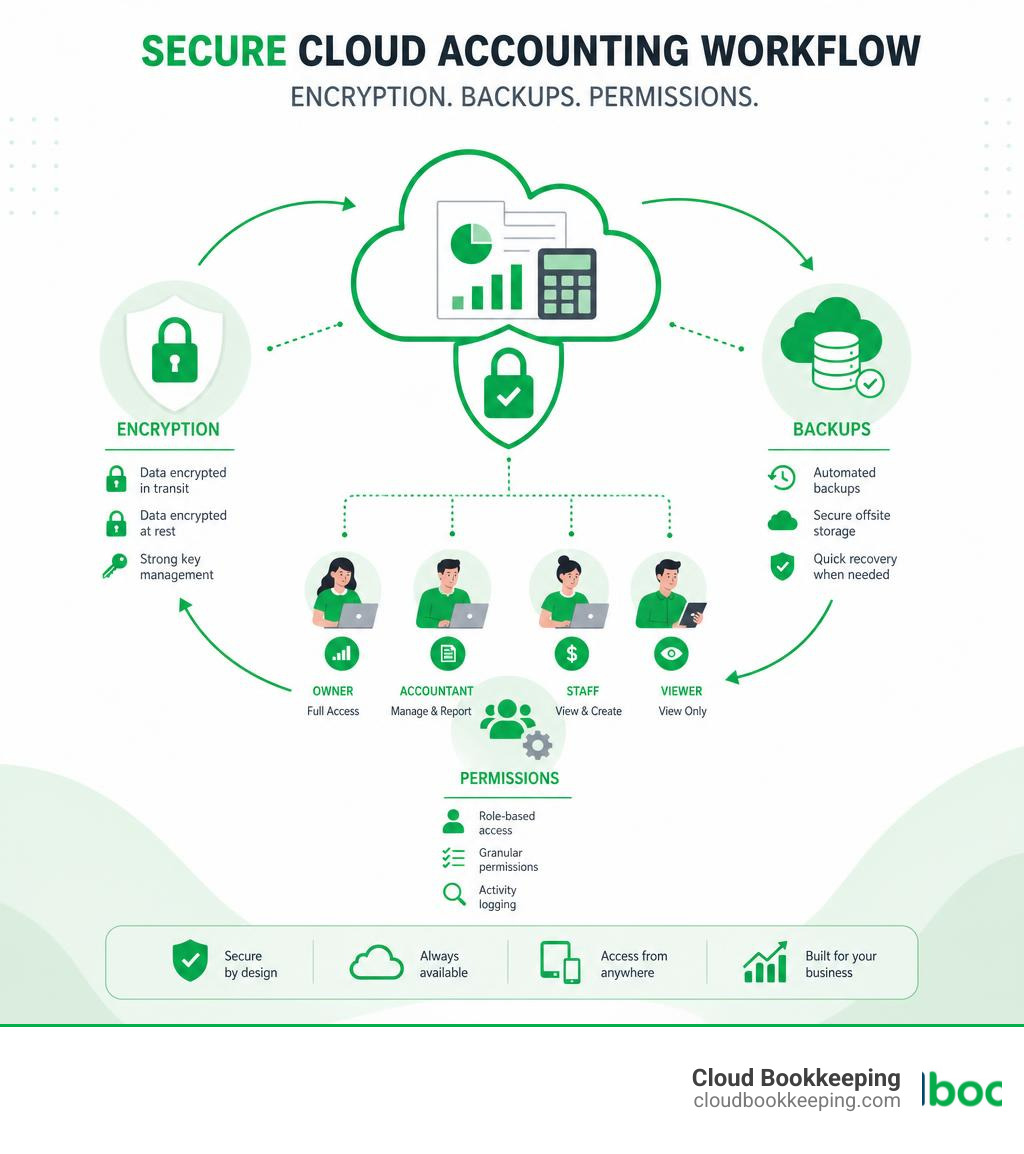
The good news is that reputable cloud accounting providers generally invest heavily in encryption, secure infrastructure, backups, access controls, and monitoring.
When reviewing any provider or platform, focus on security practices, access controls, and how your data will be handled.
You can also learn more in our small business accounting guide.
How Cloud Accounting Handles Data Security and Backups
Common security features include:
- Encryption for data in transit and at rest
- Multi-factor authentication
- Role-based user permissions
- Automatic backups
- Redundant servers
- Activity logs
- Secure data centers
- Session timeouts
- Disaster recovery processes
In many cases, cloud accounting is safer than a desktop file sitting on one computer with weak passwords and occasional backups. The biggest risks usually come from user behavior, not the cloud itself.
To improve security:
- Require multi-factor authentication
- Give each user their own login
- Avoid shared passwords
- Limit permissions by role
- Review user access regularly
- Remove former employees immediately
- Keep connected apps updated
- Use strong password practices
How Collaboration Works With Accountants, Bookkeepers, and Staff
One of the best features of cloud accounting is collaboration. Your owner, bookkeeper, CPA, office manager, and department leads can work from the same data without emailing files back and forth.
Good collaboration features include:
- Accountant access
- Role-based permissions
- Simultaneous users
- Shared reports
- Approval workflows
- Audit trails
- Notes or attachments
- Month-end review tools
This makes monthly close faster and cleaner. Instead of waiting until tax season to discover problems, your bookkeeping team can catch issues during the year.
At Cloud Bookkeeping, we use this collaborative model to provide clearer reporting and better advisory conversations. The software is the tool; the real value comes from using it consistently and interpreting the numbers correctly.
How Easy It Is to Migrate From Desktop Software
Migration can be simple or complicated depending on your current books. The process usually includes:
- Reviewing your existing accounting file
- Cleaning up old or duplicate accounts
- Choosing a conversion date
- Importing the chart of accounts
- Importing customers and vendors
- Entering opening balances
- Importing open invoices and unpaid bills
- Connecting bank feeds
- Testing reports against the old system
- Training users
- Going live
Some businesses also migrate historical transactions. Others keep prior years in the old system and start fresh with clean opening balances. The right approach depends on your reporting needs, tax records, and data quality.
Before migration, ask:
- Do we need full history or only open balances?
- Are old accounts messy?
- Are bank reconciliations current?
- Are customer and vendor lists clean?
- Do we have unpaid invoices or bills?
- Who will verify the first reports after conversion?
For help choosing and implementing the right setup, visit our Software page.
Compliance, Reporting, and Tax Preparation
Cloud accounting does not automatically make you compliant, but it makes compliance much easier when the system is set up and maintained properly.
Good accounting software helps organize:
- Income
- Expenses
- Receipts
- Sales tax
- Payroll reports
- 1099 vendor payments
- Mileage
- Asset purchases
- Loan payments
- Owner draws or distributions
- Audit trails
If you’re still weighing software options, this guide on choosing the right accounting tools can help. The IRS also shares helpful recordkeeping tips for small businesses.
Reports That Help Owners Make Better Decisions
At minimum, your cloud accounting package should produce:
- Profit and loss statement
- Balance sheet
- Cash flow statement
- Accounts receivable aging
- Accounts payable aging
- General ledger
- Transaction detail reports
- Budget vs actual reports
Growing businesses may also need:
- Project profitability
- Department reports
- Location reports
- Custom KPI dashboards
- Sales by customer
- Revenue by service line
- Margin reports
- Inventory valuation
The goal is not to collect reports like baseball cards. The goal is to answer better questions:
- Are we profitable?
- Which services make money?
- Which customers are slow to pay?
- Can we afford to hire?
- Are expenses rising faster than revenue?
- How much cash do we need for taxes?
- What should we change next quarter?
That is where bookkeeping turns into business advisory.
Tax Preparation and Compliance Support
Cloud accounting supports tax preparation by keeping records organized during the year. Helpful features include:
- Categorized income and expenses
- Receipt attachments
- Sales tax tracking
- Payroll reports
- Contractor payment tracking
- 1099 preparation support
- Fixed asset records
- Year-end reporting
- Accountant access
For San Antonio small businesses, clean books also make it easier to work with your tax preparer, respond to questions, and avoid the annual shoebox-of-receipts panic. A shoebox is not a filing system. It is a cry for help.
Keeping Records Clean Throughout the Year
The best way to prepare for tax time is to avoid waiting until tax time.
A strong monthly bookkeeping routine includes:
- Reconciling all bank and credit card accounts
- Reviewing uncategorized transactions
- Matching deposits to invoices
- Attaching receipts where needed
- Reviewing accounts receivable
- Reviewing accounts payable
- Checking payroll entries
- Reviewing sales tax activity
- Comparing reports to expectations
- Closing the month
Consistent categories matter. If the same software subscription is coded three different ways, your reports become less useful. Clean records create clean decisions.
For more support, see our guide to small business bookkeeping.
Frequently Asked Questions About Cloud Based Accounting Packages
What Is the Best Cloud Accounting Package for a Small Business?
The best cloud accounting package depends on your business needs, budget, complexity, and support team.
Consider:
- How many users need access?
- Do you sell products or services?
- Do you need inventory?
- Do you track projects or jobs?
- Do you need payroll?
- What reports do you rely on?
- What apps must connect?
- Will your accountant or bookkeeper support the system?
- How much setup help do you need?
For many small businesses, the best choice is not the system with the most features. It is the system that gives you accurate books, useful reports, and a workflow your team can maintain.
Is Cloud Accounting Software Secure Enough for Financial Data?
Yes, reputable cloud accounting systems are generally secure enough for small business financial data when configured properly.
Look for:
- Encryption
- Multi-factor authentication
- Secure servers
- Automatic backups
- Permission controls
- User activity logs
- Strong vendor security policies
- Reliable support and recovery processes
Your internal habits matter too. Use unique logins, strong passwords, limited permissions, and regular access reviews.
Can Cloud Accounting Software Replace an Accountant?
No. Cloud accounting software can handle many daily bookkeeping tasks, but it does not fully replace an accountant, bookkeeper, or advisor.
Software can help with:
- Invoicing
- Expense tracking
- Bank feeds
- Reconciliation suggestions
- Basic reports
- Receipt storage
- Payment reminders
A professional helps with:
- Correct setup
- Cleanup
- Tax-ready categorization
- Month-end review
- Financial interpretation
- Cash flow planning
- Compliance questions
- Strategic decisions
The best results come when software and professionals work together.
Conclusion
Choosing the right web based accounting system is not about picking the flashiest dashboard. It is about finding the right fit for your business model, team, budget, reporting needs, and growth plans.
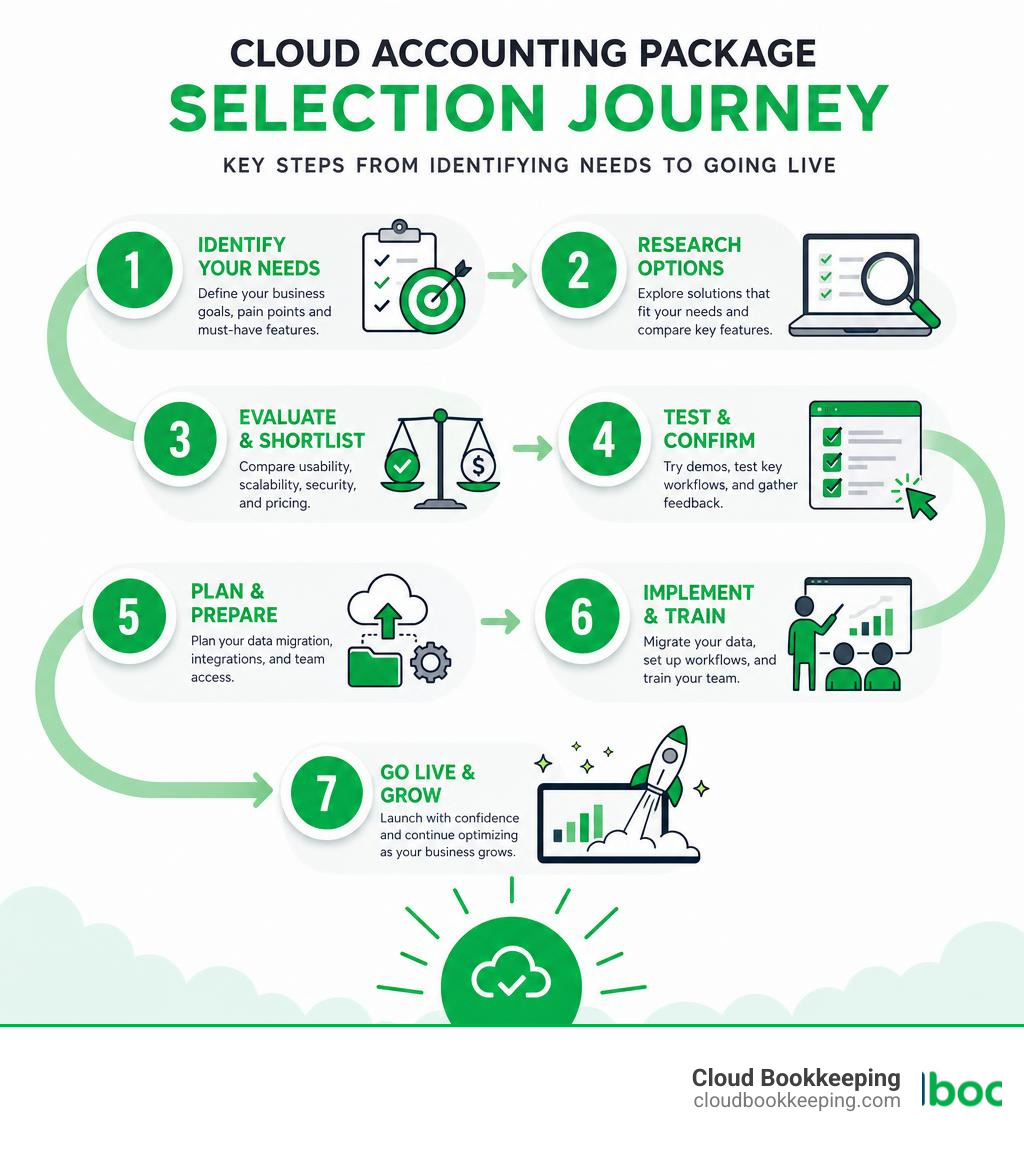
Use this decision framework:
- Identify your must-have workflows.
- Match features to your business type.
- Compare true monthly costs, not just starter prices.
- Check integrations before committing.
- Review security and permissions.
- Plan migration carefully.
- Set up monthly bookkeeping routines.
- Work with professionals who understand the system.
The right cloud based accounting packages can give you cleaner books, faster reporting, better cash flow visibility, and fewer late-night spreadsheet battles.
At Cloud Bookkeeping, we help San Antonio small businesses choose, set up, clean up, and manage cloud accounting systems with clear reporting and practical guidance. If you want help getting your books under control, contact us today.